Ludo Ninja – Mobile Board Game Template for Android Studio
Android Studio Ludo game template with Classic and Quick Play modes, bot support, local multiplayer, voice announcer, and more.
Make Someone's Day
Make someone's day by sharing this incredible item with them!
Ludo Ninja is a native Android board game template built with Android Studio. The project includes a modern user interface, AdMob monetization support, Text-to-Speech announcements, offline handling, and responsive layouts for phones and tablets.
The template is designed for developers who want to publish a Ludo-style game on Google Play or customize it for their own branding and monetization strategy.
Google Play Demo:- https://play.google.com/store/apps/details?id=com.ludoninja.ludoking
Features
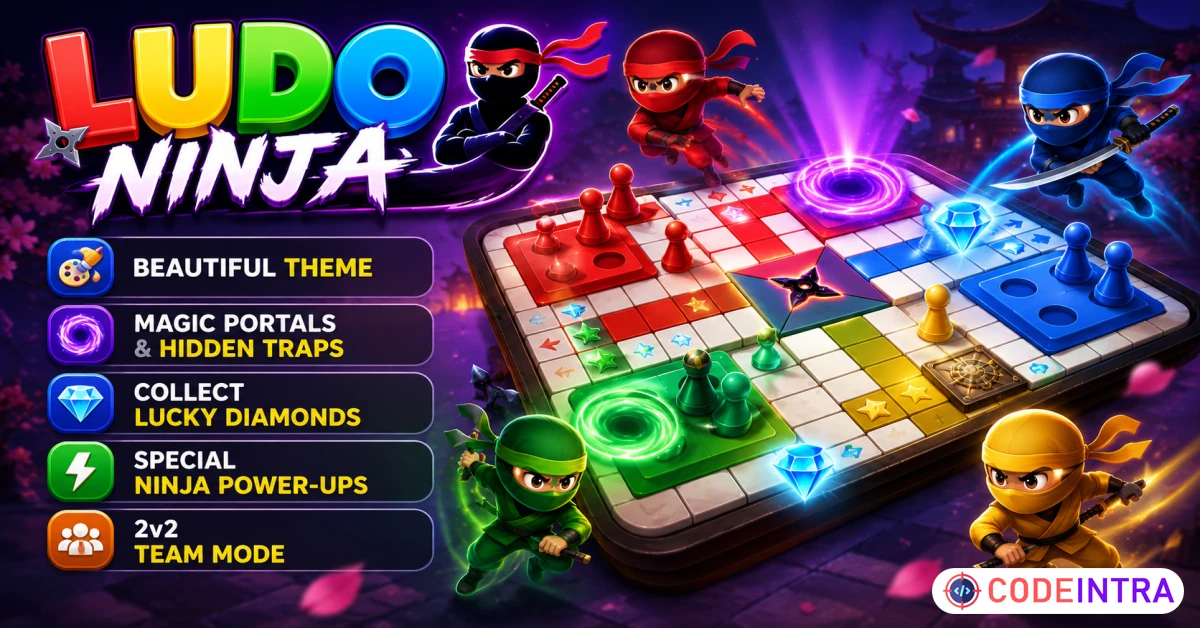
🎮Dual Game Modes: Toggle easily between classic long matches and rapid-fire quick play.
🤖Bots & Multiplayer: Play with smart offline bots or challenge friends in local seat multiplayer.
💸AdMob Integration: Native monetize setups supporting Banner, Interstitial, and Rewarded ads.
🎲Physics Mechanics: Captivating interactive 3D dice rolls and buttery-smooth token travel paths.
💎Crystals & Powers: Collect board gems to buy shields or activate the guaranteed roll six boost.
🪐Traps & Portals: Jump 3 spots forward with purple wormholes or pull back 3 with black holes.
👥Team Match: Strategic 2v2 gameplay enabling teammates to bypass blocks and work together.
🔊Voice Announcer: Highly-interactive speech assistant directing active turns, warnings, and wins.
Gameplay
- Classic Ludo board game mechanics
- Multiplayer game support
- Dice rolling system
- Turn-based gameplay
- Win and score tracking
User Interface
- Modern glassmorphism-inspired design
- Edge-to-edge Android layouts
- Animated backgrounds
- Responsive phone and tablet support
- Smooth navigation and transitions
Audio Features
- Built-in Android Text-to-Speech support
- Player turn announcements
- Sound effects support
- Music playback support
Connectivity
- Internet connection monitoring
- Offline state handling
- Automatic recovery when connection returns
Monetization
- AdMob Banner Ads
- AdMob Interstitial Ads
- AdMob Rewarded Ads
- Centralized ad configuration
Code Structure
- Java source code
- Android Studio project
- View Binding support
- Modular architecture
- Easy customization
Technical Requirements
Development Environment
- Android Studio Narwhal or newer
- Java 17
- Gradle 8+
Android Configuration
- Minimum SDK: API 24 (Android 7.0)
- Target SDK: API 36 (Android 16)
- Compile SDK: API 36
Device Requirements
- Android 7.0 or later
- Minimum 2 GB RAM
- Recommended 4 GB RAM
- Internet connection for advertisements
Package Includes
- Complete Android Studio Project
- Java Source Code
- XML Layout Files
- Assets
- Documentation
Customization
The project can be customized easily through Android Studio.
Supported modifications include:
- Package name
- Application name
- App icon
- Theme colors
- AdMob IDs
- Sound effects
- Background images
- Game settings
AdMob Integration
The project supports:
- Banner Ads
- Interstitial Ads
- Rewarded Ads
To enable monetization:
- Create an AdMob account.
- Generate ad unit IDs.
- Replace placeholder IDs inside the project.
- Build and publish the application.
Documentation is included.
Text-To-Speech Configuration
The project includes Android TextToSpeech integration.
Possible uses include:
- Player turn announcements
- Status updates
- Gameplay notifications
Voice behavior can be customized through the source code.
Build Instructions
- Open the project in Android Studio.
- Wait for Gradle synchronization.
- Configure your package name.
- Configure AdMob IDs.
- Generate a signed Android App Bundle (AAB).
- Publish to Google Play.
Compatibility
Supported Devices:
- Android Phones
- Android Tablets
Supported Orientations:
- Portrait Mode
Documentation
Included documentation covers:
- Installation
- Android Studio setup
- Package name change
- App icon replacement
- AdMob setup
- Build generation
- Play Store publishing
Support
Support is available for:
- Installation issues
- Build issues
- Setup questions
Customization services are not included.
Changelog
Version 1.0
- Initial Release

Comments (0)
Item Details


| Price |
$9
|
| Views |
6
|
| Version |
2.0
|
| Last Update |
27-Jun-2026
|
| Release Date |
14-Jun-2026
|
| Category | |
Order Confirmation
Please confirm your order. Once you confirm, the total amount will be deducted from your wallet, and the order will be placed. If you wish to make any changes, you can edit your order before pay.
By confirming, you also agree to our refund policy. Please make sure you've read and understood the terms.
Note: Coupon is applicable for items above $50